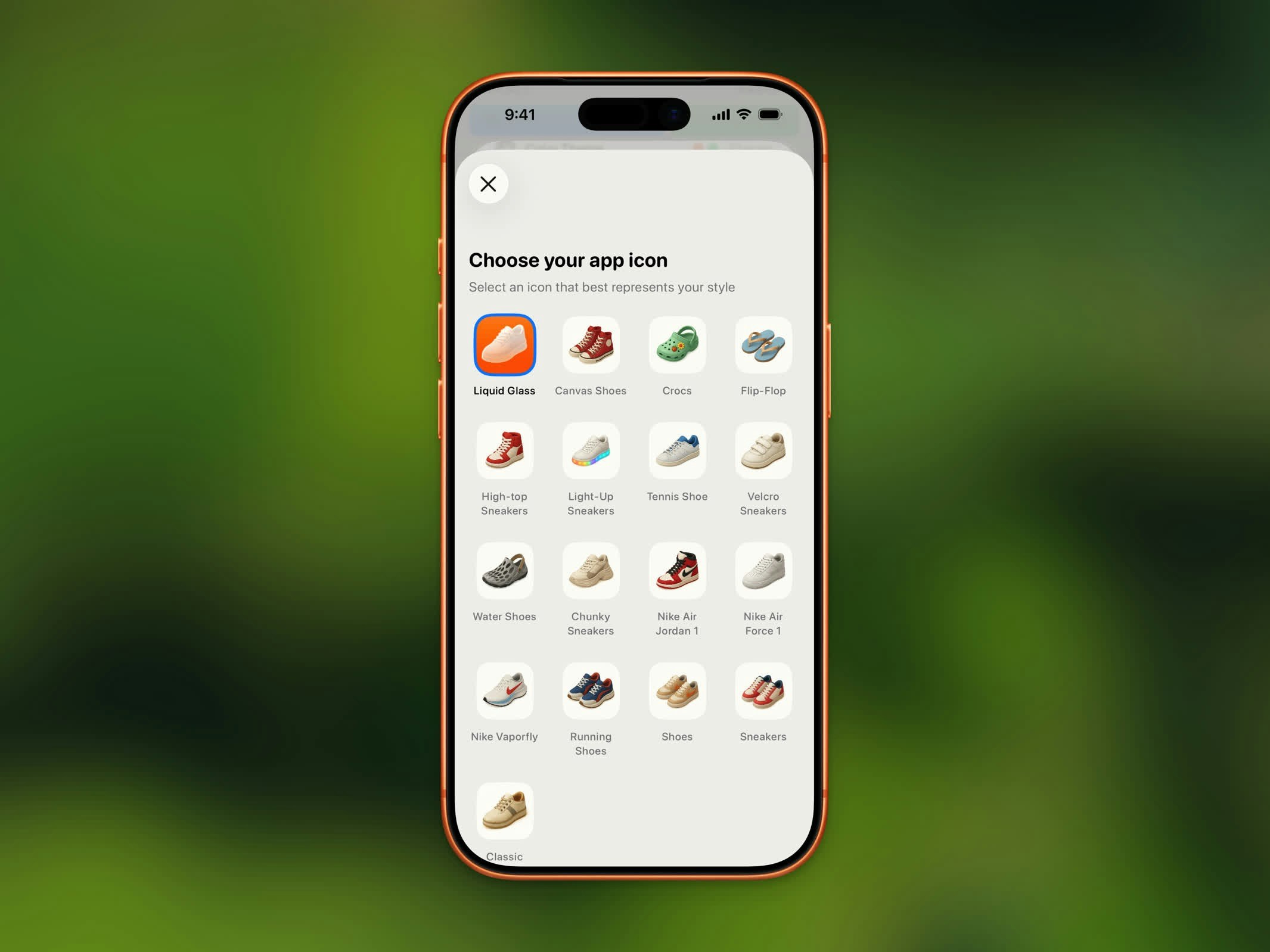
Steps lets you swap the app icon on your Home Screen from a collection of shoe-themed designs. This feature is free for all users.

Available Icons

App icon selector
Choose from 17 icon designs, each available in light and dark variants:
IconDescription
Liquid GlassDefault icon
Canvas ShoesClassic canvas sneakers
CrocsCasual crocs
Flip-FlopSummer flip-flops
High-top SneakersHigh-top basketball shoes
Light-Up SneakersKids’ light-up shoes
Tennis ShoeTennis court shoes
Velcro SneakersVelcro-strap sneakers
Water ShoesAqua shoes
Chunky SneakersPlatform chunky sneakers
Nike Air Jordan 1Iconic Jordan 1s
Nike Air Force 1Classic Air Force 1s
Nike VaporflyRacing shoes
Running ShoesStandard running shoes
ShoesSimple shoes
SneakersEveryday sneakers
ClassicClassic Steps icon

Changing Your Icon

  1. Open Settings
  2. Tap App icon
  3. Browse the icon grid and tap your choice
  4. iOS will confirm the icon change
Each icon has a dark variant that matches your system’s dark mode. The icon automatically adapts to your device’s appearance setting.