
The Best Step Counter for Seniors
Free, easy to read, and designed for adults over 65 — no account required


If you've searched for the best step counter for seniors, you've probably found dozens of apps designed for marathon runners and triathletes — none of them remotely suited to a daily neighborhood walk. Steps is different. It was built specifically for adults over 65 who want one thing: a simple, accurate count of how far they walked today, shown in numbers big enough to read without reaching for glasses. No account creation. No social challenges. No subscription required to see your steps. Walking is the single most recommended form of exercise for older adults — the CDC suggests 7,000 to 10,000 daily steps to maintain mobility, strengthen bones, and reduce fall risk — and the right step counter should make tracking that effortless, not complicated.
Sound Familiar?
- ✓Small text and cluttered interfaces are hard to read on phone screens
- ✓Apps require account creation before you can see a single step
- ✓Overwhelming social features and fitness challenges aimed at younger users
- ✓Syncing an Apple Watch with most apps requires multiple confusing steps
- ✓Paid subscriptions just to unlock basic step counting
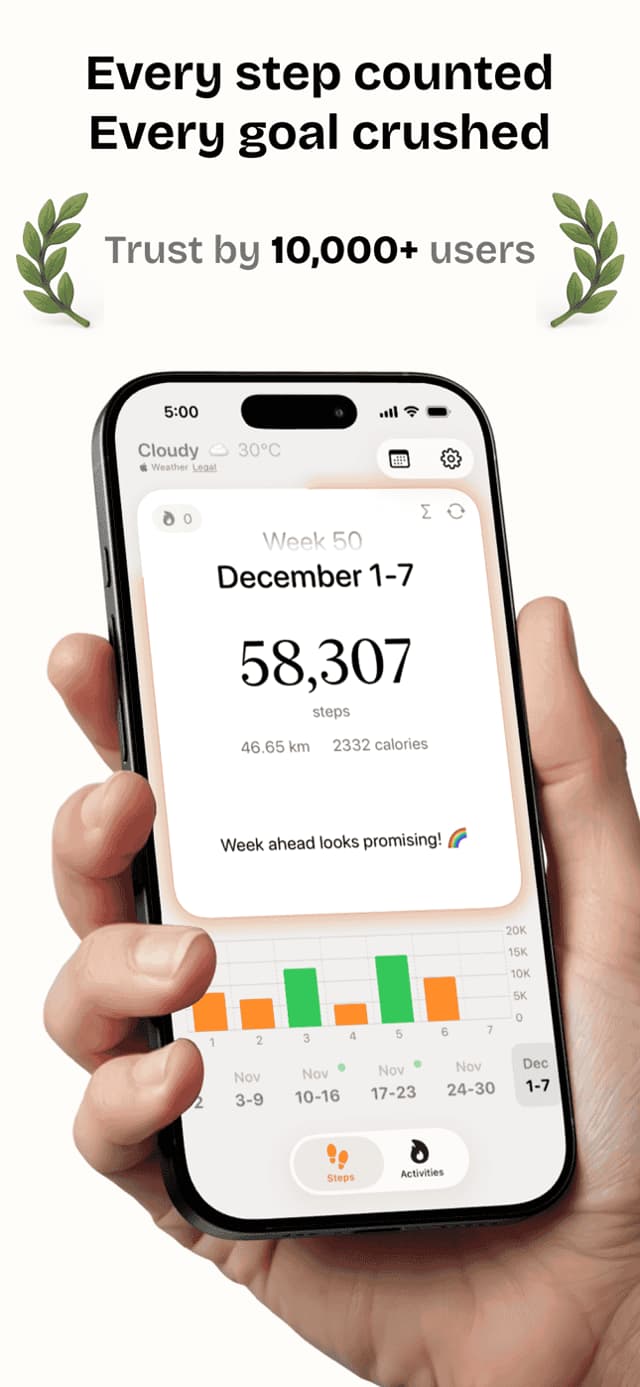
Steps was designed from the start to be the easiest pedometer app for seniors. Your daily step count appears in large, high-contrast numbers on a clean screen — no menus to navigate, no charts to interpret. The app is free, no account is ever required, and it works the moment you open it. If you have an Apple Watch, Steps syncs automatically so you never need to touch your phone during a walk. Set a gentle daily goal that fits your pace, and watch your streak grow one day at a time.
Everything You Need
Large Display
Your step count shown in big, bold numbers with high contrast — easy to read at a glance without glasses.
Apple Watch Sync
Your Apple Watch tracks steps automatically and syncs to the app — no manual logging or phone interaction needed.
Daily Goals
Set a gentle step goal that fits your pace, whether that's 3,000 or 10,000 steps per day.
Home Widgets
Add a widget to your iPhone home screen so your step count is always visible without opening the app.
No Account Required
Start tracking immediately — no email, no password, no personal information required to use the app.
See It In Action
What People Are Saying
“I tried three other apps and couldn't figure any of them out. Steps showed me my steps the second I opened it. The text is big enough to read without my reading glasses.”
“My doctor told me to walk more. Steps makes it easy to see if I hit my goal without any fuss. I love that I don't need to create an account.”
“After my hip replacement, my physical therapist recommended tracking steps. Steps keeps it simple — I just check my number each evening.”
Frequently Asked Questions
What is the best step counter app for seniors?+
Steps is the best step counter app for seniors because it shows your daily count in large, readable numbers without requiring an account, a subscription, or any setup beyond downloading. Most fitness apps are designed for younger athletes — Steps was built specifically for older adults who want simplicity. It works on iPhone alone or syncs with Apple Watch automatically.
What is the best pedometer for elderly people?+
For elderly users with an iPhone, a dedicated pedometer app like Steps is generally better than a wrist-worn pedometer device — no charging, no pairing, no small buttons. Steps uses the iPhone's built-in motion sensor (the same one that powers Apple Health) and adds an easy-to-read display, gentle daily goal, and optional Apple Watch sync.
Is there a free step counter app for seniors?+
Yes. Steps is free to download and includes a full-featured free tier that covers daily step counting, home-screen widgets, Apple Watch sync, and history. There is no trial, no credit card, and no account required to see your steps.
What is the easiest pedometer app to use?+
Steps is widely considered the easiest pedometer app to use because the entire main screen is your step count in large, high-contrast numbers. There are no dashboards, no setup screens, and no menu trees to navigate. Open the app and your steps are right there.
Is Steps easy enough for seniors to use?+
Yes. Steps was designed for simplicity above all else. The main screen shows your step count in large numbers with no confusing menus or hidden features. Most users are up and tracking within 30 seconds of downloading the app.
Do I need an Apple Watch to use Steps?+
No, Apple Watch is completely optional. Steps uses your iPhone's built-in motion sensor to count steps automatically as you carry your phone. An Apple Watch simply adds hands-free tracking so your phone can stay home.
How many steps should a senior aim for each day?+
Research suggests 7,000 to 8,000 steps daily provides significant health benefits for adults over 65. Even 4,000 to 5,000 steps reduces mortality risk compared to very low activity levels. Steps lets you set any goal that fits your current fitness.
Can I share my walking progress with my doctor?+
Yes. Steps stores your complete history and you can take screenshots of your charts to share at appointments. The app also integrates with Apple Health, which many healthcare providers can access.
Does Steps require an account?+
No. Steps never requires an account, email address, or password. Your data stays on your iPhone (or syncs through your private Apple Health database). This is rare for pedometer apps and one reason it's especially well-suited for older users.
Does Steps work without internet?+
Yes. Steps counts and stores your steps entirely on your device. No internet connection is required for basic tracking, so it works anywhere you walk.
More Fitness Guides
Start Your Daily Walking Routine
Free on the App Store. No subscriptions required to get started.