
The Pedometer for Nurses
Automatically track every step on your shift from your Apple Watch


Nurses walk an average of 4 to 5 miles during a 12-hour shift — roughly 8,000 to 10,000 steps — yet most never realize how much ground they cover. A busy hospital floor means constant movement: patient rooms, the nurses station, medication rooms, supply closets, and back again. Steps counts every one of those steps automatically through your Apple Watch without requiring you to take your phone out of your pocket or locker. By the end of your shift, you'll have a complete picture of your activity. Many nurses are surprised to find they're already meeting or exceeding daily step goals through their work alone.
Sound Familiar?
- ✓Can't touch or check a phone during patient care — hands must stay clean and free
- ✓Never realized how many miles a 12-hour shift actually involves
- ✓No way to log shift activity or see trends across days and weeks
- ✓Want to see daily totals after shifts without manually entering anything
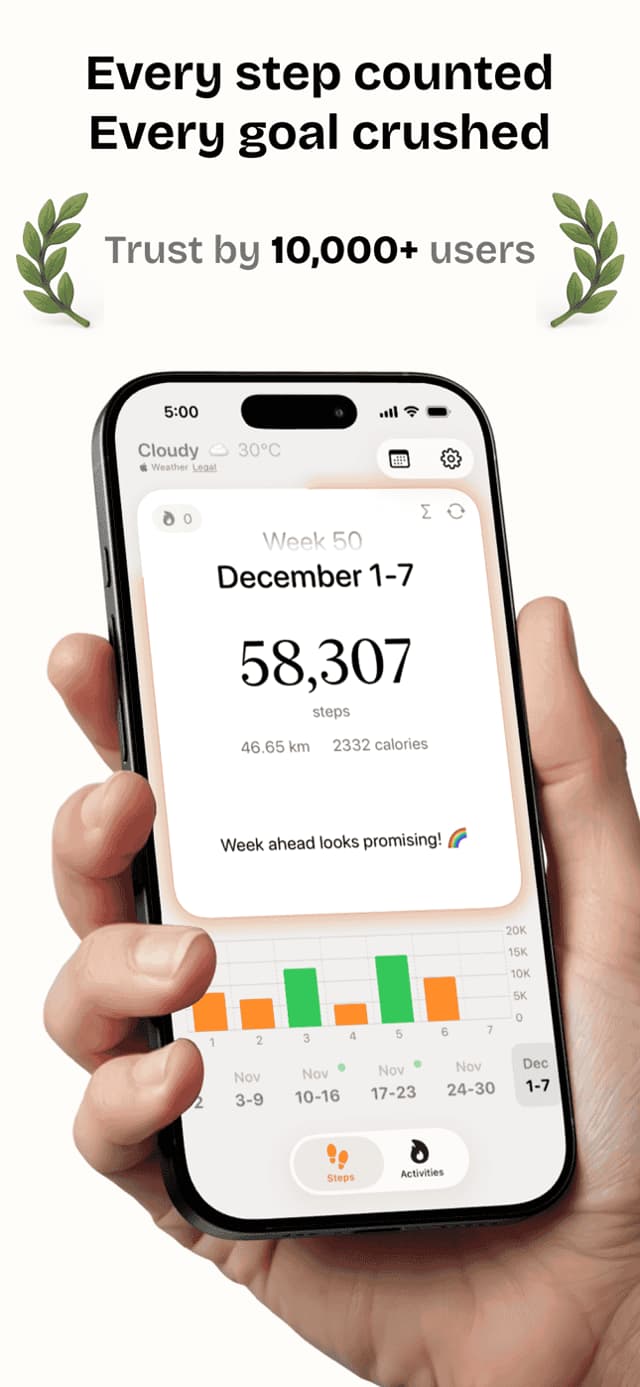
Steps works silently in the background from your Apple Watch all shift long. Every step between patient rooms, down the hallway, and through the ER is counted and stored automatically. After your shift, open the app to see your total steps, hourly breakdown charts, and distance walked. Personal records show your busiest shift days, giving you a new appreciation for the physical demands of your work.
Everything You Need
Apple Watch
Tracks every step hands-free from your wrist — no phone interaction needed during patient care.
Automatic Tracking
Steps counts continuously without needing to be opened. Check your total at the end of any shift.
Hourly Charts
See which hours of your shift were most active — useful for understanding your workload pattern.
Personal Records
Track your highest step days, busiest shifts, and longest active streaks across your work schedule.
Widgets
Glance at your current step count on your home screen without opening the app between patients.
See It In Action
What People Are Saying
“I had no idea I was walking 9 miles on overnight shifts. Steps showed me the actual number and I finally stopped feeling guilty about skipping the gym after work.”
“The Apple Watch integration is the whole reason I use Steps. I can't have my phone out in the ER. But I check my steps during every break and it motivates me.”
“As a home health aide I'm constantly driving and then walking. Steps separates it all — I can see the steps I actually took at each patient's home.”
Frequently Asked Questions
Does Steps work hands-free with Apple Watch?+
Yes. Once Steps is installed on your iPhone and paired Apple Watch, tracking happens automatically. You never need to touch your phone during a shift — just check your watch or the app after work.
How many steps does the average nurse walk per shift?+
Research shows nurses average 8,000 to 12,000 steps during a 12-hour shift, equivalent to 4 to 5 miles. ICU and ER nurses often hit the higher end due to frequent urgent movement.
Can Steps track a full 12-hour shift?+
Yes. Steps tracks continuously throughout the day with no time limit. Your hourly chart breaks down activity across all 24 hours so you can see exactly when you were most active during your shift.
Does continuous tracking drain Apple Watch battery?+
Background step tracking has minimal battery impact on Apple Watch. The motion co-processor handles step counting efficiently, typically adding only a small percentage of drain over a full shift.
Is Steps free for nurses?+
Yes. The core step tracking, hourly charts, and personal records are all available in the free version. Premium unlocks additional export options and extended history views.
Can I share my step data with anyone?+
Your data stays on your device by default. You can screenshot charts to share with colleagues or export via Apple Health if needed. No data is shared automatically.
More Fitness Guides
See How Far You Walk Each Shift
Free on the App Store. No subscriptions required to get started.