> ## Documentation Index
> Fetch the complete documentation index at: https://getsteps.app/docs/llms.txt
> Use this file to discover all available pages before exploring further.
# Yearly Goal
> Set a step target for the whole year and track your pace toward it
Beyond your [daily goal](/features/daily-goal), you can set a step target for the entire year and follow your pace toward it all year long.
## Setting Your Yearly Goal
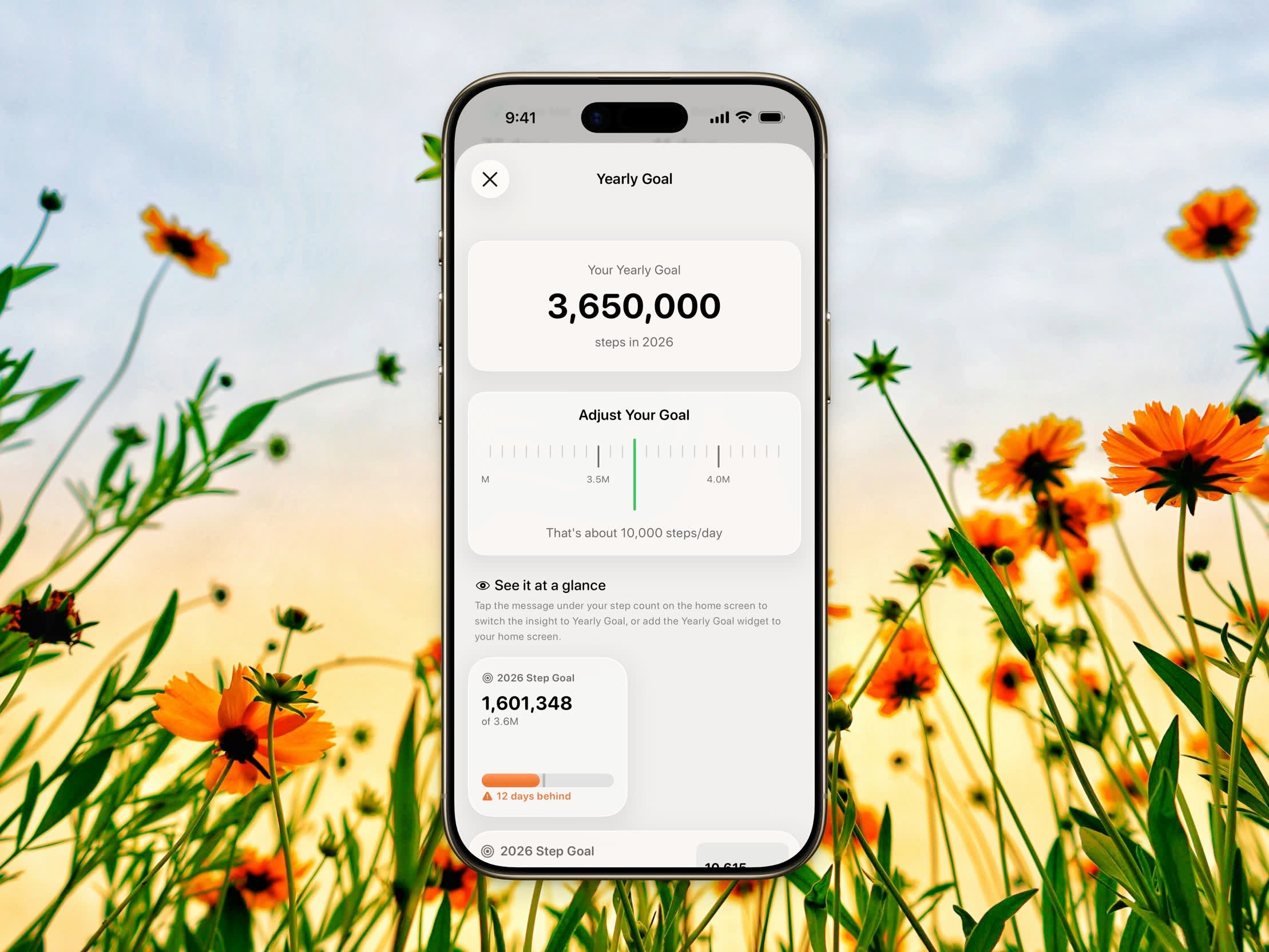 1. Open **Settings**
2. Tap **Yearly goal**
3. Use the scroll picker to choose your target, from **500,000 to 10,000,000 steps** in increments of **50,000**
4. The picker shows your daily equivalent — for example, *"That's about 10,000 steps/day"* — so you can pick a realistic target
The default yearly goal is **3,650,000 steps**, roughly 10,000 steps a day.
## Tracking Your Progress
### Insights Card
1. Open **Settings**
2. Tap **Yearly goal**
3. Use the scroll picker to choose your target, from **500,000 to 10,000,000 steps** in increments of **50,000**
4. The picker shows your daily equivalent — for example, *"That's about 10,000 steps/day"* — so you can pick a realistic target
The default yearly goal is **3,650,000 steps**, roughly 10,000 steps a day.
## Tracking Your Progress
### Insights Card
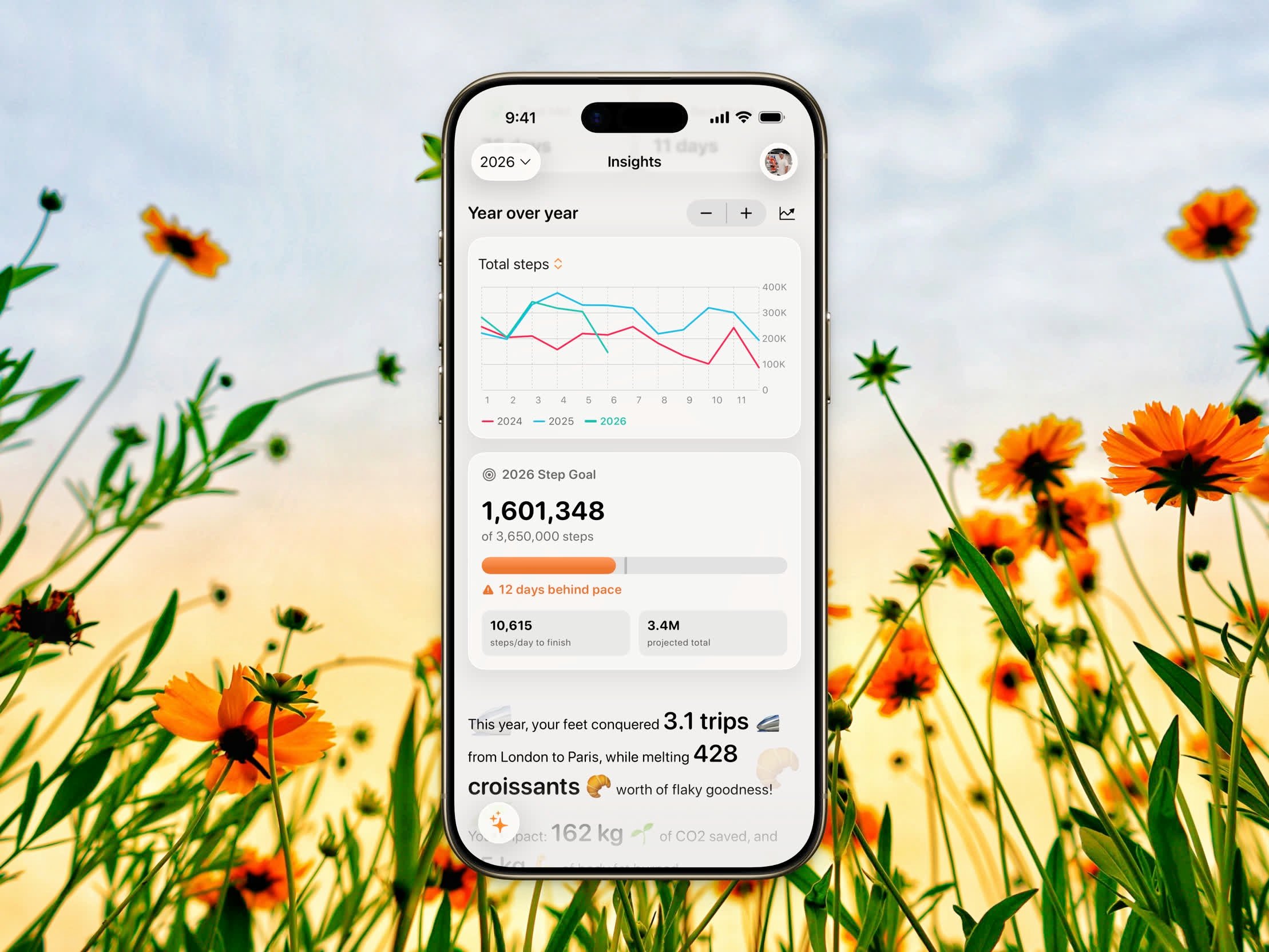 Open the [Insights](/features/insights-overview) tab to see your yearly goal card. It shows:
* Your **steps so far** out of your target (for example, *2,400,000 of 3,650,000 steps*)
* A **progress bar** with a pace marker showing where you should be today to stay on track
* A **status** line — **On track**, **On track, N days ahead**, **N days behind pace**, or **Goal reached on MM/DD**
* While you're still working toward it: the **steps per day needed to finish** and your **projected year-end total**
* Once you've hit it: how far **past your goal** you are and the **day you reached it**
For a year that's already over, the card shows the **percentage** you reached and your **daily average** for that year.
"On track" compares your steps so far against an even daily pace — your target spread across the days that have passed this year. Stay at or above that line and you're on pace to finish.
### Home Insight
Switch the home insight to **Yearly Goal** mode to see your yearly progress right under your step count on the [Home Dashboard](/features/home-dashboard). It shows a slim progress bar with the pace marker plus two key stats — steps per day to finish and your projected total, or your overage and finish date once you've reached the goal.
Tap the insight to cycle modes, or choose it in **Settings → Home insight**.
### Yearly Goal Widget
The Yearly Goal widget is a Pro feature. Setting your yearly goal and viewing it in Insights and the home insight are free.
Add the **Yearly Goal** widget to your Home Screen for an at-a-glance view. It comes in two sizes:
* **Small** — the year, steps so far, a progress bar, and a short status
* **Medium** — the same, plus stat tiles for steps per day needed and your projected total
See [Widgets](/features/widgets) for setup.
Open the [Insights](/features/insights-overview) tab to see your yearly goal card. It shows:
* Your **steps so far** out of your target (for example, *2,400,000 of 3,650,000 steps*)
* A **progress bar** with a pace marker showing where you should be today to stay on track
* A **status** line — **On track**, **On track, N days ahead**, **N days behind pace**, or **Goal reached on MM/DD**
* While you're still working toward it: the **steps per day needed to finish** and your **projected year-end total**
* Once you've hit it: how far **past your goal** you are and the **day you reached it**
For a year that's already over, the card shows the **percentage** you reached and your **daily average** for that year.
"On track" compares your steps so far against an even daily pace — your target spread across the days that have passed this year. Stay at or above that line and you're on pace to finish.
### Home Insight
Switch the home insight to **Yearly Goal** mode to see your yearly progress right under your step count on the [Home Dashboard](/features/home-dashboard). It shows a slim progress bar with the pace marker plus two key stats — steps per day to finish and your projected total, or your overage and finish date once you've reached the goal.
Tap the insight to cycle modes, or choose it in **Settings → Home insight**.
### Yearly Goal Widget
The Yearly Goal widget is a Pro feature. Setting your yearly goal and viewing it in Insights and the home insight are free.
Add the **Yearly Goal** widget to your Home Screen for an at-a-glance view. It comes in two sizes:
* **Small** — the year, steps so far, a progress bar, and a short status
* **Medium** — the same, plus stat tiles for steps per day needed and your projected total
See [Widgets](/features/widgets) for setup.